igcv3 - v1.1.0
Infrastructure for Key Management
A personal CLI wrapper because life's too short for OpenSSL flags.






🎯 What is igcv3?
I built this tool for myself because I was tired of:
- Looking up OpenSSL syntax every time - I know how it works, but when you run a specific command once a year... you know, Ebbinghaus forgetting curve... 😜
- Maintaining thousands of aliases - One alias per option combo? No thanks 😡
- Squinting at raw certificate dumps - There has to be a better way
So I made igcv3: a cross-platform, OpenSSL-free, RFC-compliant PKI toolkit (IGC is the French translation of PKI, hence the name, because I am a frenchie =þ).
- 🖥️ Pure CLI for scripting and automation
- 🎨 Interactive TUI when you need guidance
- 🧠 Zero memorization - presets handle the complexity
- 📦 No OpenSSL dependency - no OpenSSL binary required
It's the fruit of pure laziness: I just don't want to remember things. 😄
# Instead of this nightmare:
openssl req -new -newkey rsa:2048 -nodes -keyout server.key -out server.csr \
-subj "/C=FR/ST=IDF/L=Paris/O=MyCompany/CN=www.example.com" \
-addext "subjectAltName=DNS:www.example.com,DNS:example.com,IP:192.168.1.1" \
-addext "keyUsage=digitalSignature,keyEncipherment" \
-addext "extendedKeyUsage=serverAuth"
# (To be fair: OpenSSL supports config files, which helps. Still, it's easy to end up juggling flags and SAN syntax.)
# Just do this:
igc generate www.example.com
TL;DR: The Elevator Pitch
| Task | OpenSSL | igcv3 |
|---|---|---|
| Convert PEM to DER | openssl x509 -in cert.pem -outform... |
igc read cert.pem --out cert.der |
| Inspect a certificate | openssl x509 -in cert.pem -text -noout |
igc read cert.pem |
| Generate a web server CSR | 5+ flags, manual SAN syntax | igc gen my.domain --preset web-modern * |
| Fetch a remote certificate | openssl s_client -connect... + parsing |
igc get google.com --chain |
| Build a certificate chain | Manual concatenation + order guessing | igc bundle --auto *.pem |
igc generatealready selects a usable default preset (e.g.,web-standard), so--presetis only needed when you want another profile likeweb-modern.
✨ Key Features
- 🧠 Hybrid CLI: Provide arguments for scripting, or omit them for interactive prompts - the CLI adapts to your workflow
- 📋 Config-Driven: Define your organization's defaults and reusable presets in YAML
- 🤖 Automation-Friendly: JSON output for
inspectand--silentmode for scripts - 🔑 Key Matching: Instantly verify key/certificate pairs - reorganize your PKI mess with confidence
- 💻 Cross-Platform: Pure TypeScript/Node.js - works on Windows, Linux, and macOS without binary dependencies
- 🔐 Modern Cryptography: Full support for RSA, ECDSA (P-256/P-384/P-521), and Ed25519
- ✅ RFC-Compliant: CSRs follow RFC 5280 / PKCS#10 and work with ACME flows (e.g., Let's Encrypt). Built on
node-forgeand@peculiar/x509.
📦 Installation
# From npm (recommended)
npm install -g igcv3
# From source
git clone https://github.com/KaminoU/igcv3.git
cd igcv3
npm install
npm run build
npm link
🔄 Hybrid CLI Mode
igcv3 implements a Hybrid CLI pattern: commands work both as traditional CLI tools AND as interactive wizards.
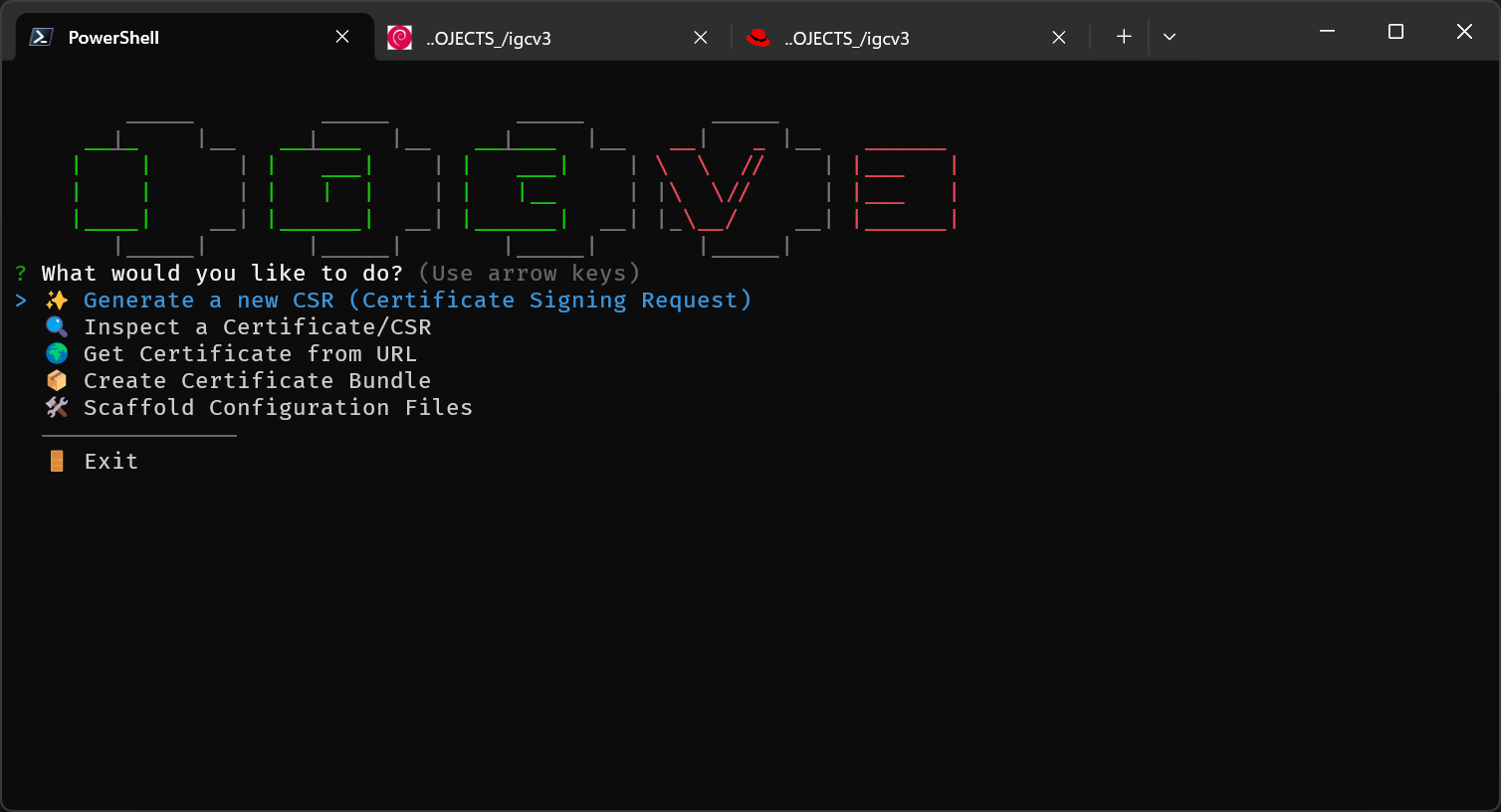
# Full CLI mode (for scripting)
igc generate api.example.com --preset web-standard --out ./certs --silent
# Full interactive mode (for exploration)
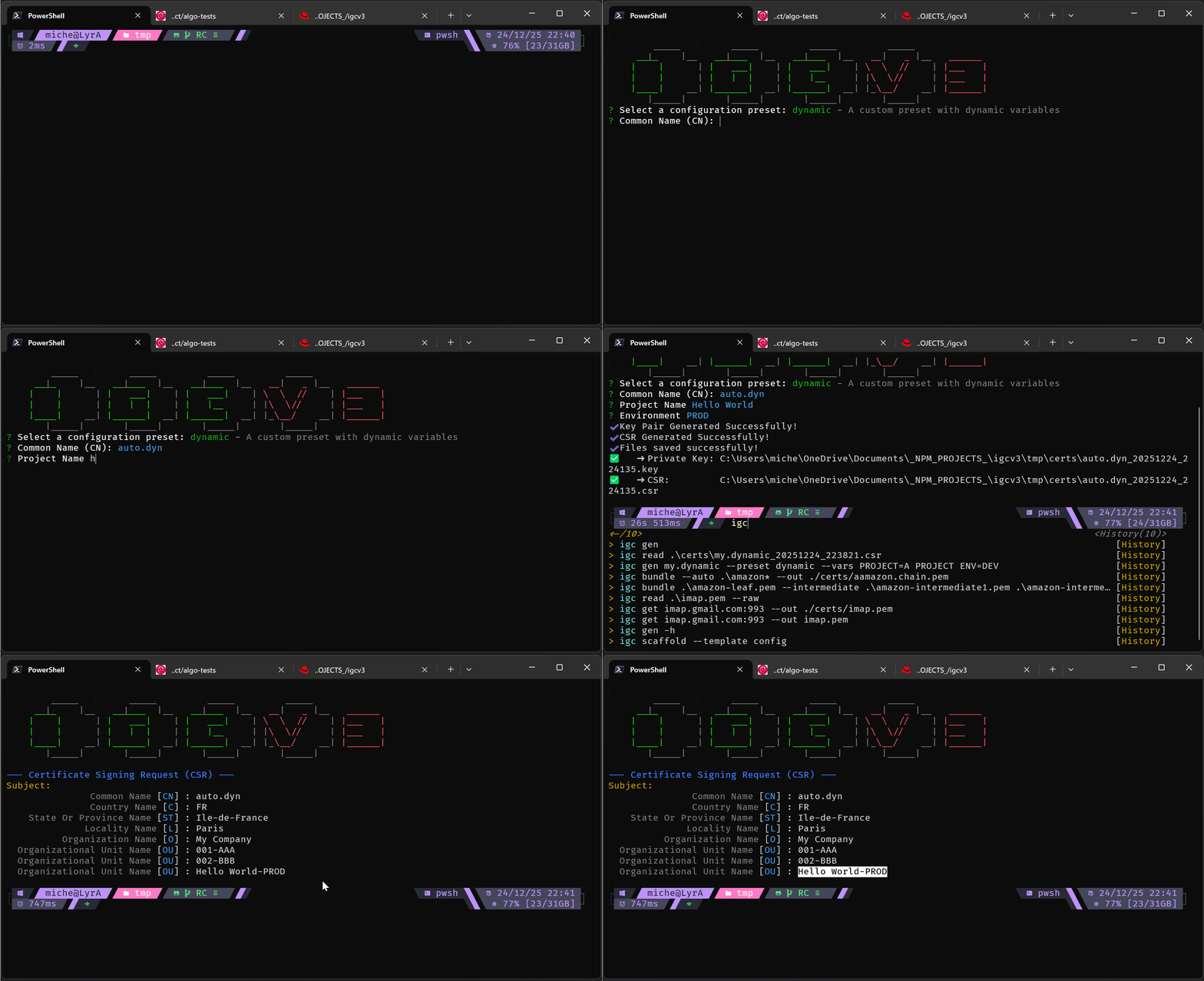
igc generate
# → Prompts for CN, preset, SANs, output directory...
# Hybrid mode (best of both worlds)
igc generate --preset web-modern
# → Only CN is missing, prompts just for: "Common Name (CN):"
Custom Preset Example:
For full configuration options, see
examples/igcv3.conf.yml
# =============================================================================
# 3. PKI Settings (Content)
# =============================================================================
pki:
interactive: true # If false, fail instead of prompting for missing variables
sanitizeName: true # If true, auto-fix CN for DNS (e.g. "My Site" -> "my-site"). If false, fail on invalid chars.
mergePresets: false # If false, local config replaces default presets instead of merging.
defaults:
countryName: 'FR'
stateOrProvinceName: 'Ile-de-France'
localityName: 'Paris'
organizationName: 'My Company'
organizationalUnitName: 'IT'
validityDays: 365
# -----------------------------------------------------------------------------
# 5. Presets (Certificate Templates)
# -----------------------------------------------------------------------------
presets:
dynamic:
description: 'A custom preset with dynamic variables'
variables:
PROJECT:
type: 'input'
message: 'Project Name'
ENV:
type: 'list'
message: 'Environment'
choices: ['DEV', 'INT', 'PROD']
validityDays: 90 # Let's Encrypt constraint
organizationalUnitName:
- '001-AAA'
- 'LETS ENCRYPT TEST'
- '{{PROJECT}}-{{ENV}}'
subjectAltName:
templates:
- 'DNS:{{COMMON_NAME}}'
Batch Manifest Example:
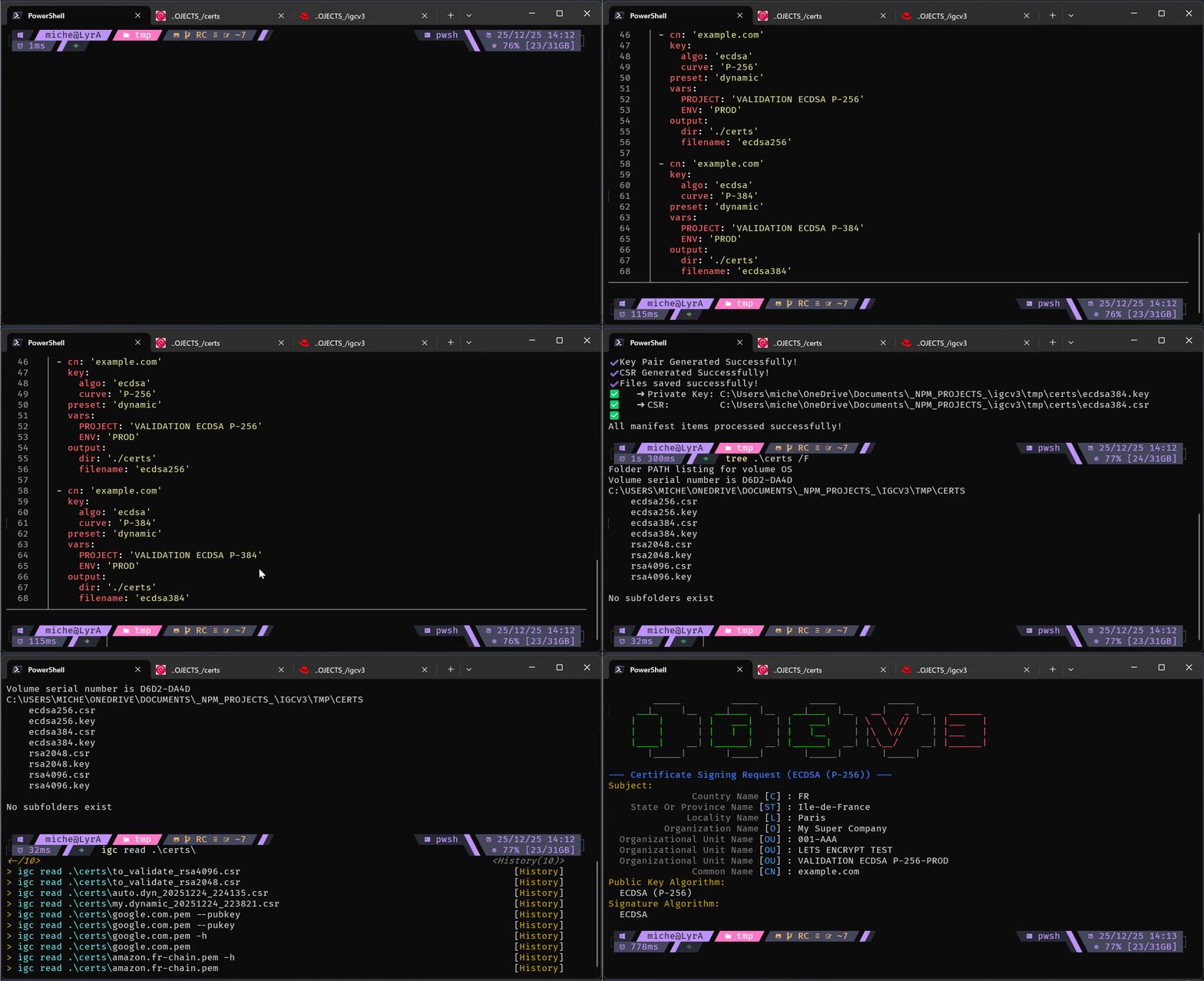
For industrial-scale certificate generation, use a manifest file to generate multiple CSRs in a single run:
# =============================================================================
# IGCV3 Batch Generation Manifest
# =============================================================================
# Usage: igc gen --manifest manifest.yml
#
# This example uses the 'dynamic' preset defined above, which requires two
# variables (PROJECT and ENV). This serves a dual purpose:
# 1. Validate that your preset configuration works correctly
# 2. Test all supported key algorithms in one batch
#
# For internal/enterprise CAs: all subject fields (O, OU, etc.) will be
# preserved in the signed certificate.
#
# For Let's Encrypt (DV): only CN and SANs are kept in the final certificate,
# but the CSR generation still validates your preset works as expected.
#
# As of late 2025, Let's Encrypt does NOT support:
# - ECDSA P-521 (too "exotic" for Web PKI standards)
# - Ed25519 (not yet accepted by CA/B Forum for public SSL)
# =============================================================================
- cn: 'example.com'
key:
algo: 'rsa'
size: 2048
preset: 'dynamic'
vars:
PROJECT: 'VALIDATION RSA 2048'
ENV: 'DEV'
output:
dir: './certs'
filename: 'rsa2048'
- cn: 'example.com'
key:
algo: 'rsa'
size: 4096
preset: 'dynamic'
vars:
PROJECT: 'VALIDATION RSA 4096'
ENV: 'DEV'
output:
dir: './certs'
filename: 'rsa4096'
- cn: 'example.com'
key:
algo: 'ecdsa'
curve: 'P-256'
preset: 'dynamic'
vars:
PROJECT: 'VALIDATION ECDSA P-256'
ENV: 'PROD'
output:
dir: './certs'
filename: 'ecdsa256'
- cn: 'example.com'
key:
algo: 'ecdsa'
curve: 'P-384'
preset: 'dynamic'
vars:
PROJECT: 'VALIDATION ECDSA P-384'
ENV: 'PROD'
output:
dir: './certs'
filename: 'ecdsa384'
This design philosophy applies to all commands: generate, inspect, get, bundle, and scaffold.
🛠️ Commands
Command Summary
| Command | Alias | Purpose |
|---|---|---|
generate |
gen |
Create keys and CSRs |
inspect |
read |
Analyze certificates and CSRs |
get |
- | Fetch remote certificates |
bundle |
- | Build certificate chains |
scaffold |
- | Generate config templates |
Global Options
These options are available on all commands:
| Option | Description |
|---|---|
-c, --config <path> |
Path to custom configuration file |
-d, --debug |
Enable verbose debugging output |
-s, --silent |
Suppress banner and non-essential output |
-i, --info |
Show application information |
-l, --log-level <level> |
Set log level (debug, info, warn, error, silent) |
Practical Examples
Below are task-oriented examples for each command. You can omit arguments to enter interactive mode.
generate / gen - Create Keys & CSRs
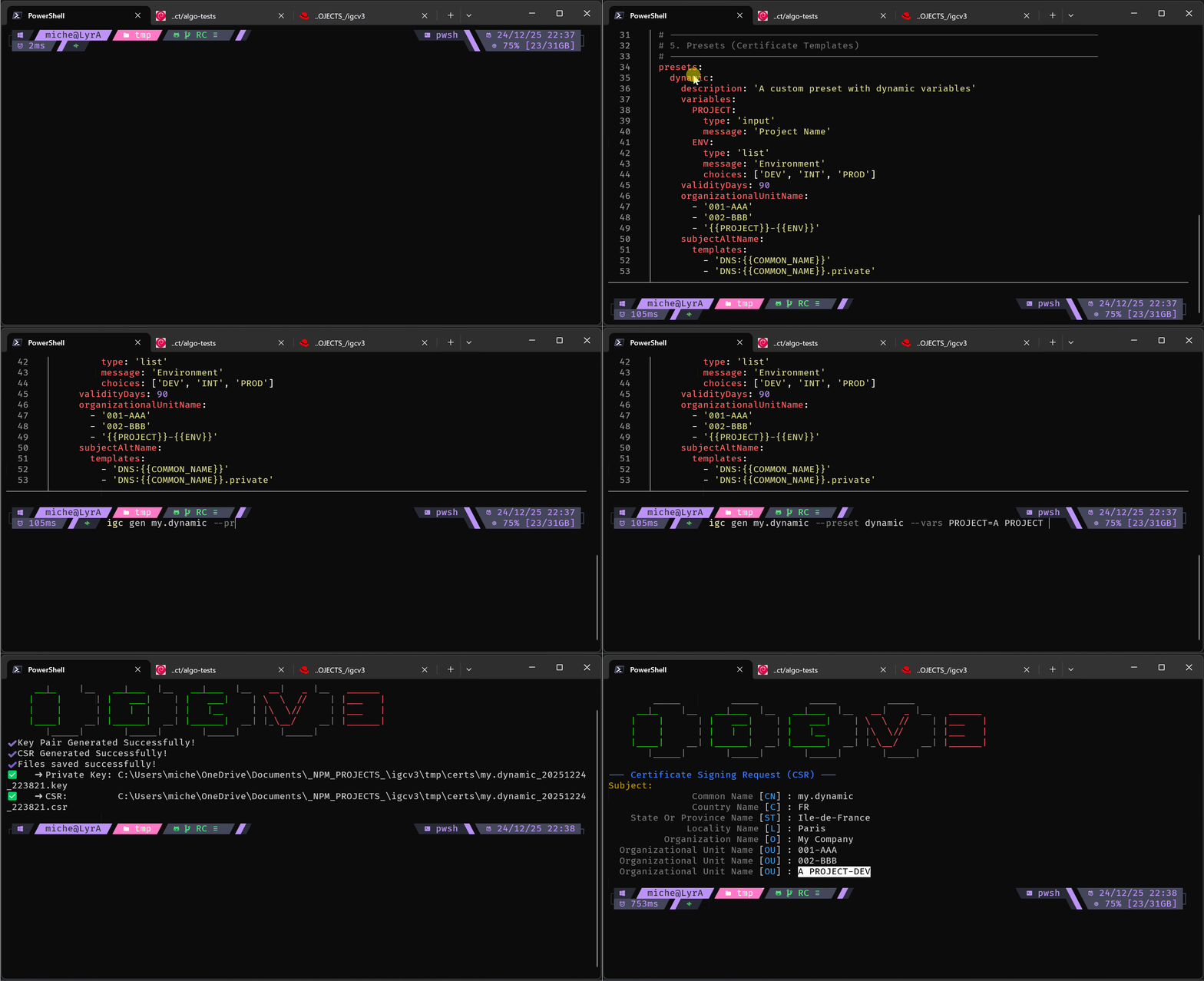
igc gen www.example.com
igc gen my.private.machine --preset machine --vars PROJECT="A Secret Project" ENV="DEV" IP_ADDRESS="192.168.3.3"
Manual mode (full CLI):
Interactive wizard mode:
Batch manifest mode:
get - Fetch Remote Certificates
igc get google.com --chain --out google.chain.pem
igc get imap.gmail.com:993 --out imap.gmail.pem
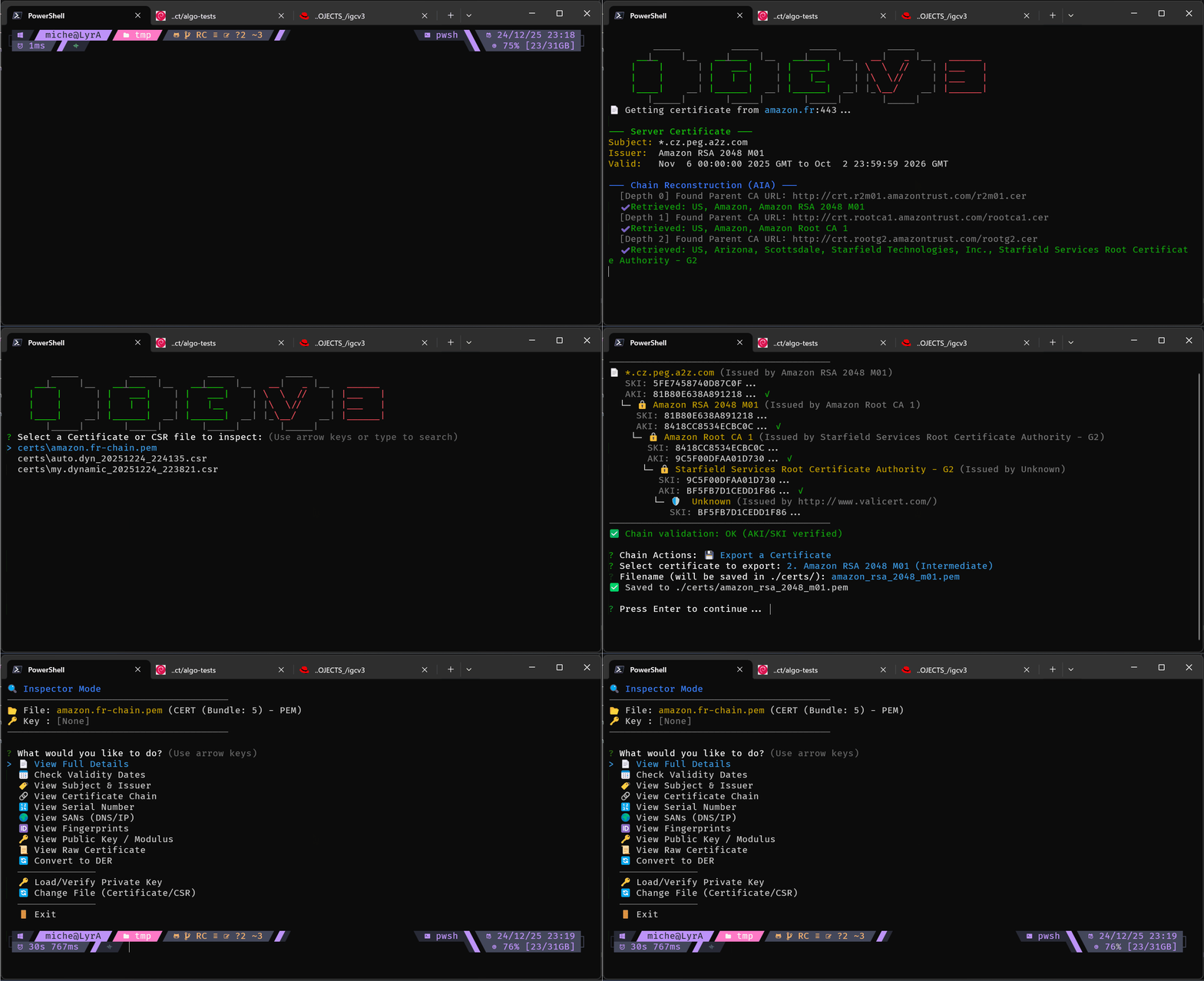
inspect / read - Analyze Certificates & CSRs
igc read cert.pem --json
igc read cert.pem --out cert.der
#!/bin/zsh
# Match csr (or cert) to its private key
csrs=(*.csr)
keys=(*.key)
for key in $keys; do
echo "🔑 Checking key: $key"
for (( i=1; i <= $#csrs; i++ )); do
csr=$csrs[$i]
match=$(igc read "$csr" --key "$key" --match-only 2>/dev/null)
# or
# match=$(igc read "$csr" --key "$key" --json 2>/dev/null | jq -r '.keyVerification.match')
if [[ "$match" == "true" ]]; then
echo " ✅ Match -> $csr"
csrs[$i]=()
break # Comment it out if one key can match multiple CSRs/Certs
fi
done
done
bundle - Build Certificate Chains
igc bundle --auto my.site* --out fullchain.pem # Auto-detect and sort (magic!) - I told you, lazy am I... 😜
igc bundle leaf.pem --intermediate inter1.pem inter2.pem ... intern.pem --root root.pem --out chain.pem
⚠️ Performance note:
bundle --autois meant for a chain-sized handful of files. If you point it at a folder with 25,000 PEMs, it will (politely) take its time. Prefer tighter globs (likemy.site*above) rather than*.pem, or use--chainfor explicit inputs.
scaffold - Generate Config Templates
igc scaffold --template config
igc scaffold --template manifest
🔐 Supported Algorithms
| Algorithm | Key Generation | CSR Generation | Certificate Reading |
|---|---|---|---|
| RSA 2048 | ✅ | ✅ | ✅ |
| RSA 4096 | ✅ | ✅ | ✅ |
| ECDSA P-256 | ✅ | ✅ | ✅ |
| ECDSA P-384 | ✅ | ✅ | ✅ |
| ECDSA P-521 | ✅ | ✅ | ✅ |
| Ed25519 | ✅ | ✅ | ✅ |
💡 Tip: Use
web-modernpreset for ECDSA P-256 (recommended by Let's Encrypt for performance).⚠️ Note on Ed25519: While igcv3 fully supports Ed25519 for key/CSR generation and certificate reading, no public Certificate Authority currently issues Ed25519 TLS certificates. Ed25519 is primarily used for SSH keys, code signing, and internal PKI. For public web servers, use ECDSA P-256 or RSA.
⚙️ Configuration
igcv3 is a Node.js, config-driven application. Create at least the main configuration file (igcv3.conf.yml) to get started; scaffold makes it easy and safe.
igcv3 uses three YAML configuration files:
| File | Purpose |
|---|---|
igcv3.conf.yml |
Main config with org defaults and reusable presets. Supports cascade loading (local → user → system). |
manifest.template.yml |
Batch CSR generation. Define multiple certificates with their presets for fully automated, non-interactive runs. |
chain.conf.yml |
Bundle config. Define certificate chain paths for those who prefer explicit over --auto. |
# Generate starter configs
igc scaffold --template config # → igcv3.conf.yml
igc scaffold --template manifest # → manifest.template.yml
igc scaffold --template chain # → chain.conf.yml
igc scaffold --template all # → all three
📂 Click on the file names above or browse the
examples/folder for fully commented samples.
📝 Using with Let's Encrypt
As a RFC-compliant tool, igcv3 works seamlessly with Let's Encrypt ACME validation. Here's a typical workflow:
-
Generate a CSR for your domain:
igc generate example.com --preset web-modern -
(Optional) Verify your CSR at certlogik.com/decoder (independent check). For a quick local sanity check, you can also use
igc inspect path/to/your.csr. -
Request the certificate via certbot:
certbot certonly --manual --csr example.com.csr --preferred-challenges dns -
Complete the DNS challenge: Add the TXT record provided by certbot.
-
Retrieve your certificates: certbot creates the signed certificate + intermediate chain via ACME.
💡 Tip: Use
--preset web-modernfor ECDSA P-256, recommended by Let's Encrypt for performance.
🧪 Testing
Unit tests (Jest) and end-to-end tests (PowerShell) cover core logic and CLI workflows.
npm test # Unit tests (Jest)
npm test -- --coverage # Coverage
./tests/main.ps1 # E2E/integration tests (PowerShell)
./tests/main.ps1 -Verbose # With detailed output
| Suite | Description |
|---|---|
| 01 | Global CLI options |
| 02 | Scaffold command |
| 03 | Get command (remote TLS) |
| 04 | Inspect command + JSON + algorithms |
| 05 | Bundle command + auto-sort + glob |
| 06 | Generate command + RSA/ECDSA/Ed25519 |
Note: Unit tests focus on pure logic; interactive flows are exercised in the PowerShell E2E suites. Some edge cases can still slip through ; if you find a bug, please open an issue. 🐛
🚧 Known Limitations
| Feature | Status | Notes |
|---|---|---|
| TLS Implicit (443, 993, 995) | ✅ Supported | Direct TLS connection |
| STARTTLS (587, 143, 110) | ❌ Not supported | Requires protocol handshake |
| Hardware tokens (HSM, YubiKey) | ❌ Not planned | PKCS#11 not in scope |
🗺️ Roadmap (Nice-to-Have)
These features are not essential but would be nice additions. Contributions welcome! 🎉❤️
- [ ] STARTTLS support for SMTP/IMAP (port 587, 143, 110)
- [ ] OCSP checking for revocation status
- [ ] P12/PFX export with password protection
- [ ] Self-signed certificate generation (for local dev/testing)
- [ ] Your idea here? Open an issue! 💡
🏗️ Project Architecture
igcv3/
├── src/
│ ├── commands/ # CLI command implementations
│ │ ├── generate/ # Generate command (modular)
│ │ └── inspect/ # Inspect command (modular)
│ ├── config/ # Configuration loading & validation
│ ├── lib/ # Business logic (chain validation, etc.)
│ ├── services/ # PKI services (RSA, ECC providers)
│ ├── types/ # Local type overrides / shims
│ └── utils/ # Shared utilities (logger, formatting)
├── tests/
│ ├── fixtures/ # Test data (configs, certificates)
│ ├── lib/ # PowerShell test helpers
│ ├── output/ # Generated test artifacts (gitignored)
│ └── suites/ # PowerShell integration tests
└── examples/ # Example configuration files
Key Design Decisions:
- Modular Commands: Large commands are split into focused modules (~200 lines each)
- Facade Pattern:
PkiServiceprovides a unified API over multiple crypto backends - Discriminated Unions: TypeScript unions for algorithm-specific configs (RSA vs ECDSA vs Ed25519)
- Config Cascading: Custom → Local → User → System defaults
👥 Contributing
Contributions are welcome! Here's how to get started:
Development Setup
git clone https://github.com/KaminoU/igcv3.git
cd igcv3
npm install
npm run build
npm link # Makes 'igc' available globally for testing
Running Tests
npm test # Unit tests (watch mode: npm test -- --watch)
./tests/main.ps1 -Verbose # Integration tests
Code Style
- Language: TypeScript strict mode (
noImplicitAny) - Linting: ESLint + Prettier (run
npm run lint) - Commits: Imperative mood, English (
Add feature, notAdded feature) - Code: English (variables, comments, docs)
Pull Request Process
- Fork the repository
- Create a feature branch (
git checkout -b feature/amazing-feature) - Write tests for your changes
- Ensure all tests pass (
npm test && ./tests/main.ps1) - Submit a PR with a clear description
See CONTRIBUTING.md for detailed guidelines.
📄 License
MIT © 2025
Made with ❤️ by a lazy guy, for all lazy buds everywhere. ^^